

AI智能摘要
此内容由AI根据文章内容自动生成
Tolaria 是一款专为AI时代设计的开源本地笔记工具,由《Refactoring》作者Luca基于多年写作经验打造。它结合了Notion的块编辑优势和Obsidian的数据主权理念,采用纯Markdown + YAML格式存储,确保数据安全与灵活性。内置Git支持版本控制,使笔记管理更加高效便捷。对于追求高效知识管理和隐私保护的用户来说,Tolaria提供了一个强大且可靠的解决方案。
介绍
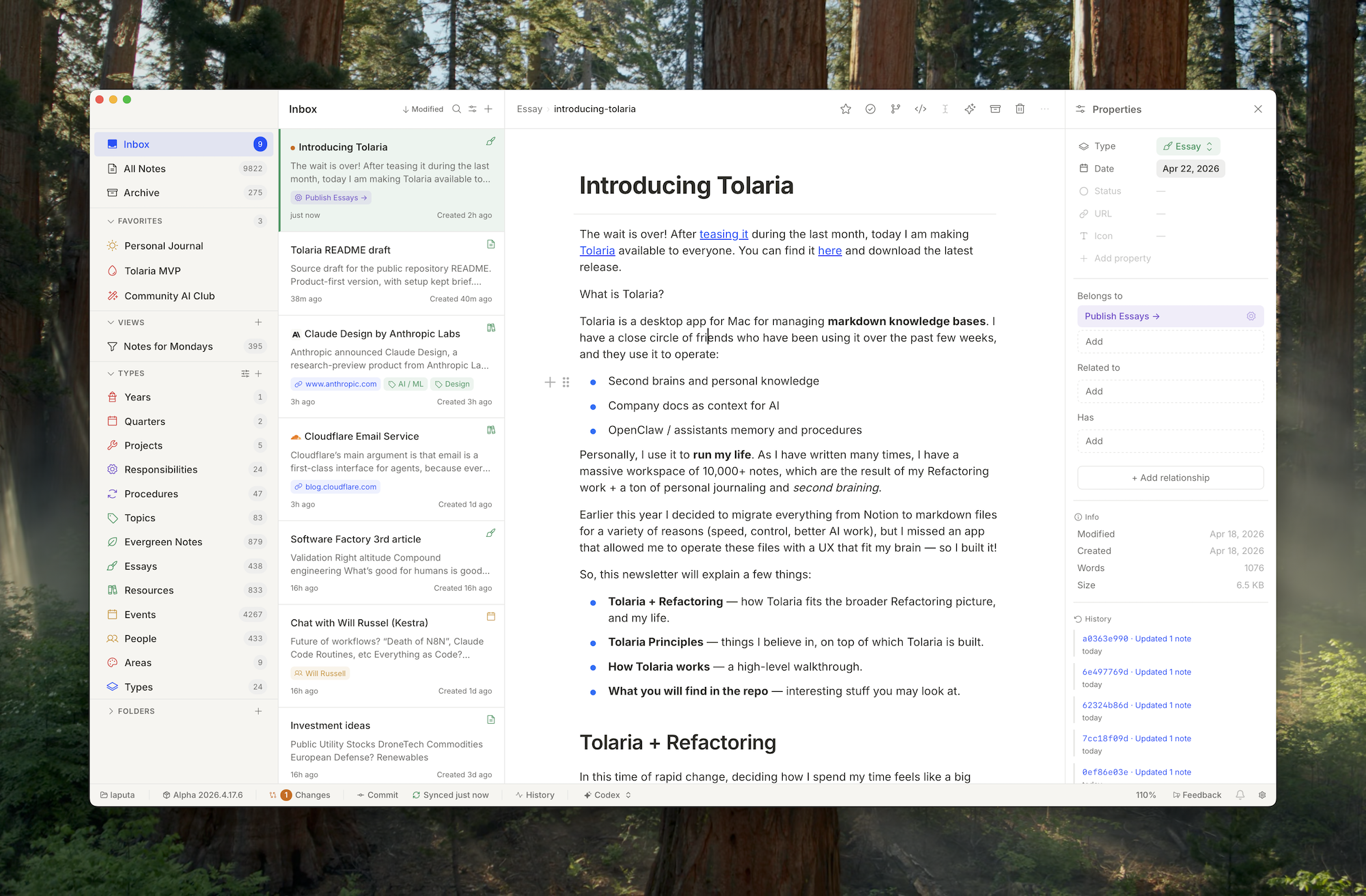
Tolaria 是面向 AI 时代的开源本地笔记工具,由 Refactoring 作者 Luca 基于 5 年全职写作、9000+ 笔记的管理经验打造。工具融合 Notion 的块编辑体验与 Obsidian 的本地数据主权理念,用纯 Markdown + YAML 文件存储笔记,内置 Git 版本控制,支持双向链接与 Type 分类视图。Tolaria通过原生 MCP 服务器,可无缝对接 Claude Code 等外部 AI,让用户在不锁定云端、不绑定订阅的前提下,拥有高度自由的知识管理系统。
软件截图
软件特点
- 数据主权绝对化:纯本地文件存储,Tolaria 停止维护,知识库依然完整可用。
- 版本控制专业化:内置 Git 替代简陋回收站,提供程序员级别的历史追踪与分支管理能力。
- AI 策略开放性:通过 MCP 成为外部 AI 的友好容器,不捆绑特定模型,用户始终掌握 AI 选择权。
- 分类理念轻量性:Type 仅作导航透镜,避免 Notion 式“结构先行”带来的前期搭建负担。
- 编辑体验现代化:保留 Notion 的块编辑与键盘优先交互,同时落地为通用 Markdown 格式。
软件功能
- 块编辑体验:支持 Notion 风格的
/命令、拖放图片与模块化排版,所有内容实时写入纯 Markdown。 - 双向链接网络:通过
[[wikilinks]]建立笔记关联,自动追踪反向链接与引用关系。 - 轻量 Type 分类:为笔记标记类型(如 Project、Essay)和赋予颜色图标,仅作视觉透镜,不强制填写字段。
- 内置 Git 版本控制:将整个笔记库作为 Git 仓库管理,支持提交、推送、历史浏览与 Diff 对比,替代传统回收站。
- AI 原生集成:内置 MCP 服务器,允许 Claude Code 等外部 AI 直接读取目录、搜索笔记、新建或修改文件。
- 查询视图:按类型、日期、标签等条件筛选笔记并保存为自定义视图,实现轻量数据库功能。
更新日志
v2026.08.28
New Features
- 🩼 Stuck 2027.7.31 installs can update again — The future-dated 2027.7.31 build now accepts current stables, so those apps can move forward without a manual reinstall.
Improvements
- 🎨 Clearer dark-mode selection — Selected text stays readable in the dark editor instead of disappearing into the background.
- 📄 Table of contents keeps tildes — Headings with
~stay intact in the TOC and still jump to the right place. - 🖼️ Image renames stay in sync — Renaming an attached image updates the note so the picture does not break.
- 🪟 Windows note titles keep their path — Windows title and wikilink paths no longer get rewritten into the wrong shape.
- 🤖 Codex Safe matches current CLI — Safe mode launches on current Codex versions instead of failing on a retired approval flag.
- 📋 Steadier lists and IME — Nested lists keep their indent, slash commands reopen after composition, and the AI placeholder stays out of the way while you type.
Stability and Fixes
- Recovered leftover 2027.* installs so the next real 2026.x update can land without another version trap.
- Stopped stale editor uploads from writing the wrong file, and skipped Windows recycle metadata during vault scans.
- Isolated scripted HTML block previews and rejected invalid raw-editor cursor positions.
- Kept AI chat focus after switching apps, honored the default vault you picked, and expanded MCP tilde paths.
- Honored parent-repo gitignore rules and kept rename detection from blocking the editor.
THE END














暂无评论内容