


AI智能摘要
此内容由AI根据文章内容自动生成
CopyQ是一款开源且跨平台的高级剪贴板管理工具,适用于Windows、macOS和Linux系统。它能够帮助用户高效管理剪贴板中的多种格式内容,如文本、图像及HTML等,并支持通过全局快捷键快速检索使用。此外,该工具还提供了自定义外观、标签分类以及多标签页等功能,极大提升了日常操作的便捷性与灵活性。对于频繁进行复制粘贴工作的用户而言,CopyQ无疑是一个强大的助手。
介绍
官方网站:https://github.com/hluk/CopyQ
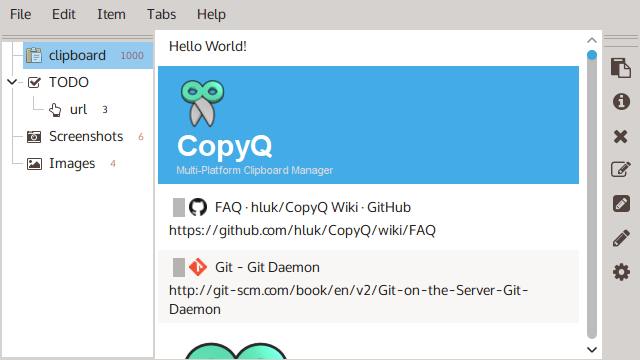
CopyQ 是一款开源的、跨平台剪贴板管理工具,支持 Windows、macOS、Linux,可以帮你管理保存在剪贴板中的多个文本、图像、HTML 等格式内容,并在需要的时候快速检索,支持全局快捷键、自定义外观、标签、多标签页(分类)、编辑等功能,还支持自动运行命令,比如检测到网页链接则自动添加标签等高级功能。
软件截图
更新日志
17.0.0
Added
- Adds support for GNOME 50
Changed
- Tab data and state files are moved to XDG-compliant directories,
%LOCALAPPDATA%on Windows and~/Library/Application Supporton macOS . State path can be changed usingCOPYQ_STATE_PATHenvironment variable. Important: This is backwards incompatible. The data and state files are moved when the new app version starts. Older versions of the app will not see these files and basically lose all items. - FakeVim is updated from upstream repository.
Fixed
- Fixes audio engine always using a small amount of CPU and indicating (on KDE) that it plays audio (#3684). The engine is initialized only when needed and released after it stops playing all audio.
- Fixes initial script dialog size
- Fixes slow tab icon lookups when the app contains many item tabs
- Fixes keeping old tabs in configuration
- Windows: Prevents app from attempting (unsuccessfully) to paste to windows the user cannot switch back to
- Wayland: Fixes global shortcuts failing when portal service starts later or restarts
- Wayland: Fixes global shortcuts in non-default sessions
- Wayland: Fixes rebinding global shortcuts on start
- Synchronize plugin: Fixes GUI freeze when removing items and on startup and retrying to remove absent files
THE END

















暂无评论内容